Your Google Ads Are Now Wearing Your Reputation on Their Sleeve
Author:
Melissa Morrison
Category:
Digital
For years, there was a workaround for businesses with a shaky reputation: if your Google Business Profile rating wasn’t great, you could still buy your way to the top of the search results with a text ad that didn’t show star count. Customers would click, and maybe never even notice the 3.2-star rating waiting for them on Maps.
That workaround is gone.
What Changed
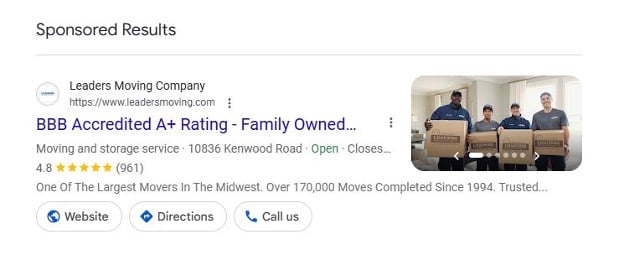
Google Search Ads now pull directly from your Google Business Profile (GBP) — star ratings, review counts, location and hours, and photos — and weaves them right into your standard search ad creative. Once your GBP is linked to your Google Ads account, these show up automatically as asset extensions:
- Location & Hours — your address and real-time open/closed status
- Ratings & Reviews — your star rating and review count, right below the headline
- Visual Carousels — photos sourced from your GBP, giving searchers a look at your storefront or work before they even click
In other words, the wall between your organic reputation and your paid reputation has come down. Whatever your business looks like on Google Maps is now exactly what shows up when you pay to be seen.
The Uncomfortable Part
If a business has a low rating and decides to run ads anyway, it’s no longer hiding that fact — it’s amplifying it. Paying for an ad now means paying to put your star rating in front of more people. A poor reputation doesn’t get masked by ad spend anymore; it gets a bigger megaphone.
This changes the calculus for local advertisers completely. Reviews aren’t just a “nice to have” for organic SEO anymore. Now, they’re a direct input into paid performance.
Why Getting Reviews Just Became a Paid-Media Strategy
- It lowers your cost-per-click. Google Ad Rank factors in “expected asset impact.” Ads with strong ratings and high review volume get clicked more, and Google rewards that CTR with lower CPCs. This means better reviews literally stretch your ad budget further.
- It protects your visual brand. Google now pulls photos from your Google Business Profile directly into your ads. If you aren’t adding fresh, high-quality images, Google can pull an old, blurry, or unflattering photo into a paid placement you’re spending real money on.
- It keeps you eligible for high-intent searches. For “best [service] near me” queries, Google filters out low-rated businesses across both organic and paid results. No reviews, no rating, no shot at that traffic.
Why Responding to Reviews Just Became Just a Important
Getting reviews is only half the equation. How a business engages with them matters, too.
- It builds trust at the moment of decision. Shoppers who click an ad often check the review count to validate the business. An owner who thanks happy customers and handles complaints professionally reassures anyone on the fence.
- It boosts prominence in Google’s algorithm. Google has said directly that responding to reviews improves local SEO and prominence, and higher prominence means your ad assets are more likely to win the auction over competitors.
- It feeds Google natural-language keywords. A reply like “Thanks for choosing us for your AC repair in Cincinnati” quietly hands Google contextual, location-specific language that strengthens both your Maps ranking and your paid search relevance.
The Bottom Line
Reputation management is now part of the media buy. It can no longer be treated as a side project. Every unanswered review, every stale photo, every star rating a business hasn’t worked to improve is now something they’re paying to broadcast. The businesses that treat review generation and response as seriously as their ad budget are the ones that will get cheaper clicks, better placements, and more trust from every person who sees their ad.

Melissa Morrison
Digital Marketing Manager, Holland Adhaus
Melissa consistently brings a unique blend of professionalism and joy to every project she does.